Introduction
Submitted by f8eho on Wed, 25/02/2015 - 13:40

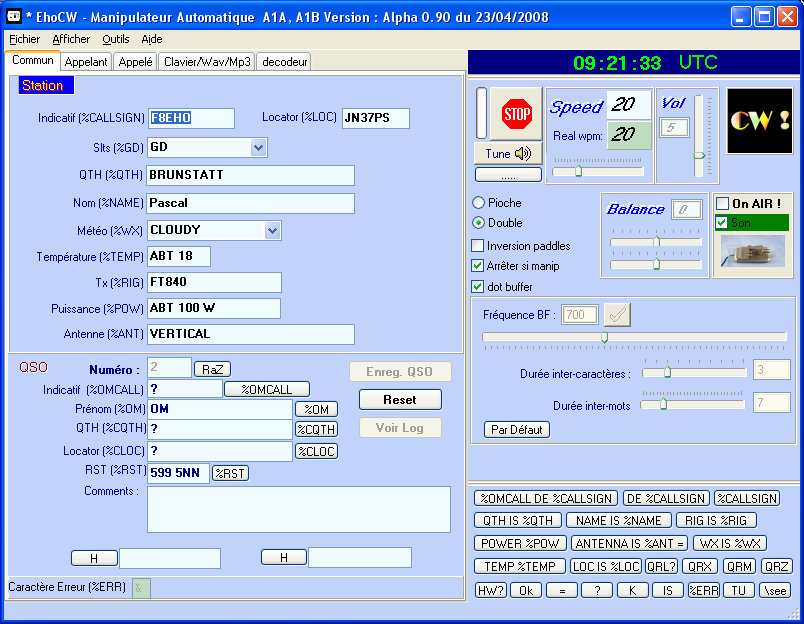
EhoCW est un programme permettant d'utiliser son PC pour faire de la télégraphie (code 'morse').
Il peut être utilisé facilement par tout télégraphiste, débutant ou chevroné, qui désire utiliser son PC comme keyer à mémoire.
C'est un outil destiné particulièrement à la communauté des radioamateurs.
Pour manipuler, on peut utiliser le clavier du PC, ou alors une clé (pioche, double contacts, etc) branchée sur le PC via le port joystick ou un port série (com).
Un générateur de textes aléatoires permet le choix des différentes catégories de caractères (lettres, chiffres, ponctuations, personnalisés, dictionnaire de mots).
EhoCW permet de convertir des textes choisis (copiés/collés) ou générés, en fichiers au format wav ou mp3, c'est pratique pour utiliser un lecteur audio pour l'apprentissage du code morse. (en voiture, en attendant le train, etc...).
Un langage de macros simple, permet d'intégrer des commandes dans le texte, changement de vitesse de manipulation, boucles, lecture de lettres par une voix en français ou en anglais.
EhoCW permet la manipulation pour les gauchers par inversion des paddles.
Il peut piloter un émetteur radio par un port série et une interface simple à réaliser (entrée keyer, et push to talk éventuellement).
Voir en détail les fonctionnalités.
EhoCW a été développé langage C++, pour obtenir les performances nécessaires.
Je suis à votre écoute concernant toutes suggestions d'améliorations, conseils avisés de télégraphistes expérimentés ou autres commentaires.
EhoCW est libre de droits, librement téléchargeable et utilisable à volonté.